Wheel and Tires
10008 TPMS Tool User Guide
1. Check and Change TPMS Status
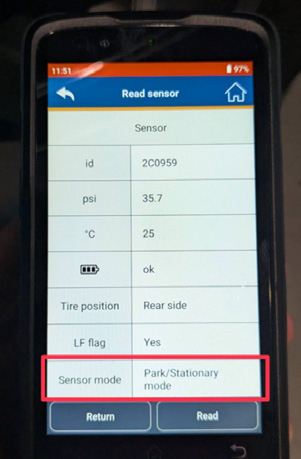
The TPMS sensor has three status modes. Please ensure the sensor is set to the correct mode before installation.
OFF Mode
This is the power-off status.
Used for storage in the parts warehouse.
Ensures the battery is not consumed.
Park Mode
This is the standby status.
All TPMS sensors must be switched to Park Mode
before installation on the vehicle.
Required for the pairing process.
Drive Mode
Vehicle speed is approximately equal to or above
18km/h
2. Enter Pairing Mode
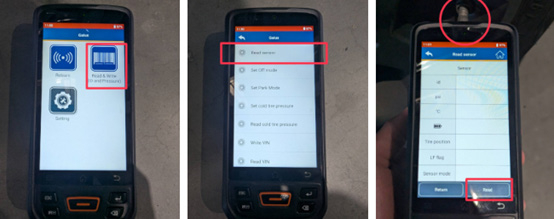
Use the TPMS tool to start the pairing process.
Follow the diagnostic device instructions.
Read all tire sensors one by one, according to the sequence shown on the diagnostic tool
3. Verify Tire Pressure
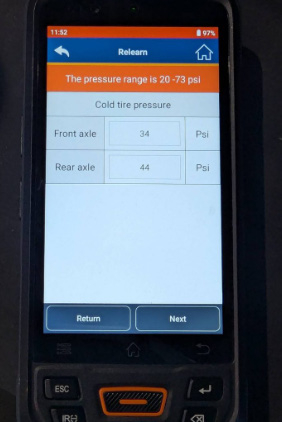
Make sure that the tire pressure of all wheels is within the manufacturer’s standard range.
Adjust if necessary before proceeding.
4. Write Data to TPMS Control Unit
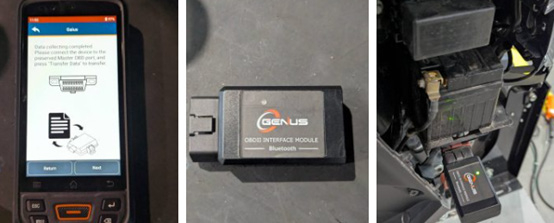
Connect the TPMS tool’s OBD connector to the vehicle’s OBD port.
Transfer the sensor data into the TPMS control unit.
After a 1-minute road test, confirm that the tire pressure is displayed on the dashboard.